By the numbers
Repo facts, not outcomes. Nobody has measured whether it made me faster.
- 166commits
- 108days from first commit to last
- 99colour values in 9 locked scales
- 0automated tests, so checking means opening the page
The 90-second version
- The problem was never the list. It was deciding, every time I opened it, which line to do.
- The fix lives in the database: one open task per project is marked as the head after every write, and the dashboard only reads it.
- Dates are secondary. A task only gets one when the calendar chose it, and overdue reads “waiting”, not a day count.
- When the server is slow or down, the dashboard still says “nothing active”. A real defect, found while making this case study, not fixed.
- The colours that tell the areas apart fail WCAG AA contrast. An axe-core run measured it, and it is not fixed.
Overview
Beth Tasks started on May 30, 2026 as a phone-checkable task list on Neon Postgres. It replaced Notion as the task master, and it grew into a command center: tasks and projects across seven life areas, a content calendar, and a read-only month from Google Calendar.
This case study is about one small part of it. Every active project has exactly one next task, the database picks it, and the Up Next board shows one lead task per area. The same table feeds the second brain agent that tells me what to do each morning.
Screens use fictional sample data (a freelance pet sitter who writes a newsletter), because the real data is mine.
What the video shows
- 0 to 3 s: the dashboard loads. For about three seconds all five area cards say “nothing active”, then the data arrives.
- 3 to 9 s: five areas each lead with one task. The cursor hovers the Business card to show the full title.
- 9 to 17 s: the cursor checks off the Business task and the next one takes its place.
- 17 to 31 s: the Projects page, then one project page with its “done when” line, progress and roadmap.
- 31 to 35 s: the Calendar, a read-only month.
- 36 to 40 s: a reload with the server failing. A banner says “Server unavailable” and four of the five cards still say “nothing active”.
Problem
In September I wrote this to my agent: “for 3 days i have been trying to organize my entire life using PARA and notion… and i am spiraling and iterating and still not satisfied.” I wanted it presentable “in an easy way for my adhd brain to see quickly at a glance.”
Two things made it hard. A long list asks me to choose, and choosing is the expensive part. And the list was lying: under the old rule every task got a due date, 145 of them, and most of those dates were invented by the agent. That produced fake overdues, and a date I know is fake motivates nothing.
Persona
“I only like to and can focus on one thing at a time.”Beth, to her agent, September 29, 2026. Typos fixed, wording kept.
It is me, and I do not need a composite. On October 13 I added that I will mention “a million things” at once and can only hyperfocus on one.
So the user is one person who can hold one task at a time, who loses a day to organizing, and who reads a screen at a glance or not at all.
Research
No interviews and no usability tests. One user, and I am her. What I did read and run:
- My design law, written July 14 and applied to the dashboard in seven commits by July 25: symmetry, no orphans, calm copy, one radius.
- A task audit on September 23 across 382 open tasks in 46 projects, with six mechanical checks and three tasks I had named as missing.
- The date law of August 29, written after the every-task-gets-a-date rule produced those 145 dates.
- The browser itself. The 0px text bug below was found by measuring, not by looking.
Key decisions
-
The database picks the next task, not the browser.
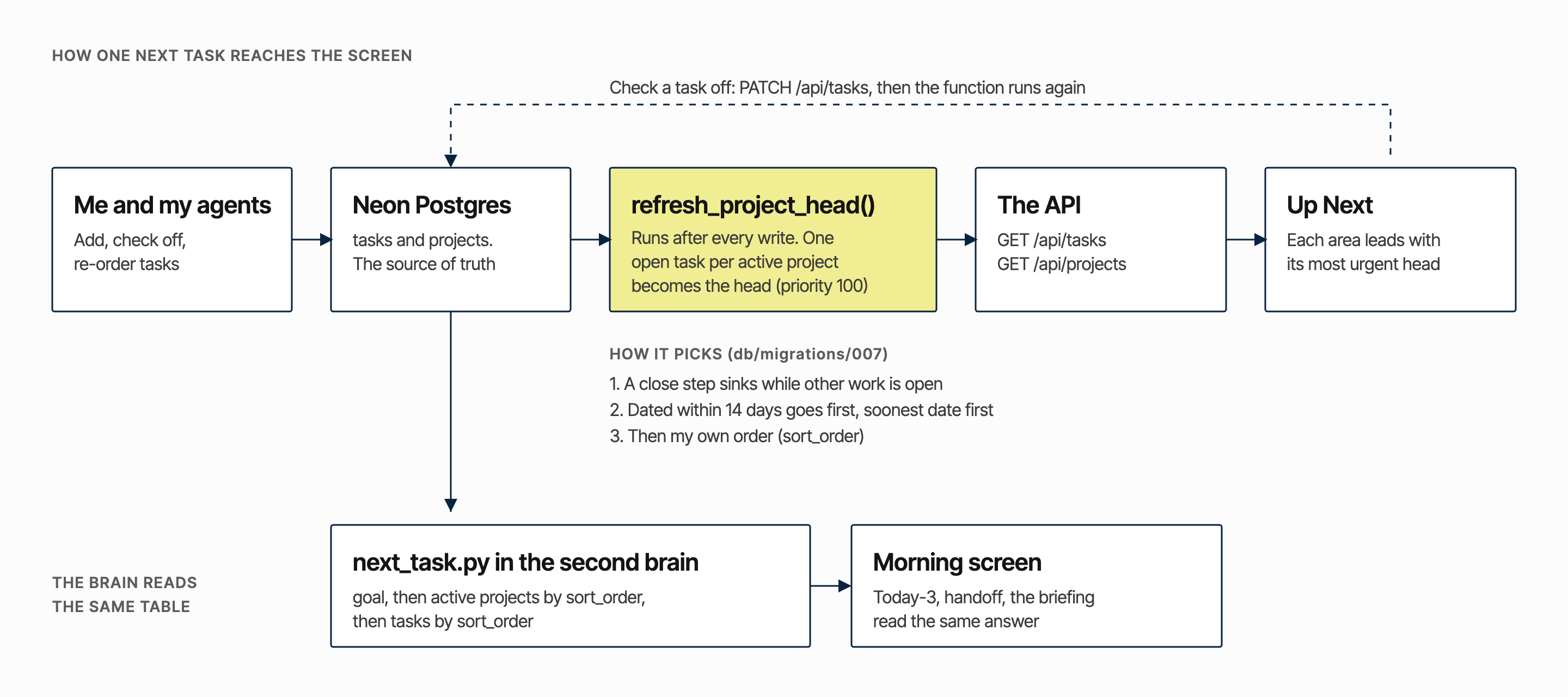
The first version used a ranked list from the brain (July 19). Then I ranked each area’s tasks by urgency in the browser (July 20). Then came text rules so a task reading “PARKED” would stop leading its area (July 22). On September 15 all of it became one SQL function, run after every write: a project’s closing step waits while other work is open, anything dated within 14 days goes first, then my own order.
What it cost. The rule lives in Postgres where there are no tests, and closing steps are found with a regular expression, so a differently worded task can slip through.
-
Priority first, date second.
Sorting by date meant priority changed nothing, and an undated “do now” sank under every dated “someday”. Now the date orders tasks inside a priority band. A date exists only when the calendar chose it, and overdue reads “waiting”.
What it cost. An undated task can never be overdue, so urgency has to come from somewhere else. For business work it comes from project milestones.
-
Fourteen days is as far as “next” can see.
Work due further out leaves the Up Next card, and the area screen says how much is waiting: “1 scheduled further out, showing the next 14 days”. Thirteen far-off tasks left the card the day it shipped.
What it cost. Nothing is hidden from the app, but it is hidden from the front page until it is near.
-
Home is a routine, not a pile.
The Home card shows today’s one chore from a rotation, because a 36-day-overdue chore that was not mine had become the false number one.
What it cost. Those chores are not database tasks, so their check-off lives in the browser, per day, and does not follow me to another device.
-
Five identical cards, and measure before fixing.
Cards stay the same size (the symmetry rule). When the task text looked clipped I measured it: on a 101px card the due chip took 43px of 49px and the text computed at 0px wide. The text had been in the page the whole time. The chip now sits under the text.
What it cost. Three-line wraps in narrow cards.
Accessibility
I did not set a WCAG target when I built it. On October 16, axe-core 4.10 (WCAG 2.0, 2.1 and 2.2, levels A and AA) ran against the demo build with sample data. The only rule that fired was colour contrast.
Colour is the category key here, so fixing it means choosing between darker fills and dark text on the current colours. That is open.
| Where | Failures | Worst measured |
|---|---|---|
| Dashboard | 17 | White on Content pink 1.76:1. Health 2.39:1. Personal 2.86:1. Home 3.09:1. Business 3.71:1. Appointment days 2.46:1. AA needs 4.5:1. |
| Projects | 7 | “Finish” chips in area colours, 1.65:1 to 3.22:1 |
| One project page | 4 | Same chips and labels |
| Business area screen | 0 | No failures |
What already works: area checklists are real buttons, habit boxes carry a date label and a pressed state, and project cards take Enter and Space.
What does not: five “Mark done” buttons share one name, the full task text only appears on hover, and the dashboard has no focus style of its own. Not tested: screen reader, a keyboard-only pass, zoom.
Flow
One loop. I add or check off a task, the API writes to Neon, the function re-picks the head, and the board reads the new head. The second brain reads the same table for the morning screen.
Hi-fi screens
Dashboard
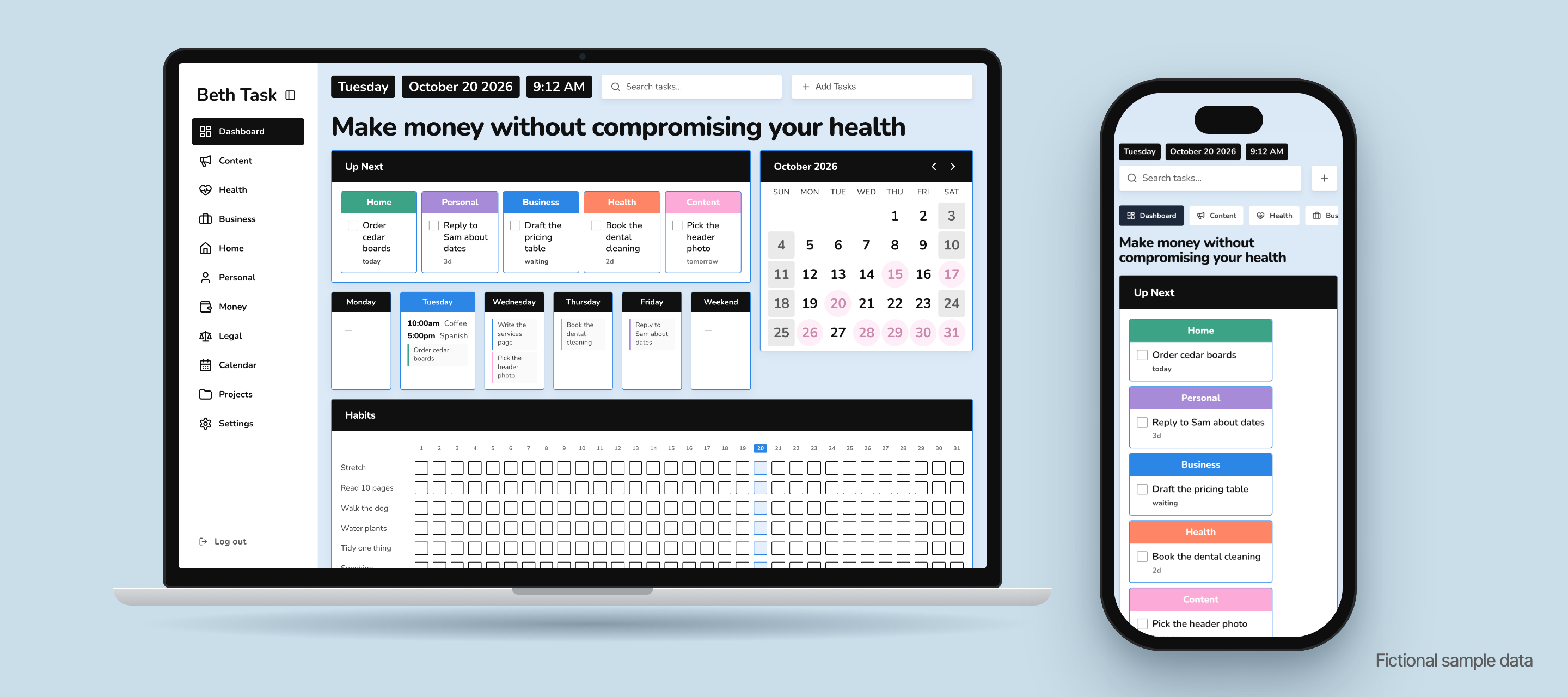
Five areas, one lead task each, overdue as “waiting”. The headline is the goal, not a greeting.
Why it works that way: every card is the same size, the area colour is the only encoding, and no card shows a count of days overdue.

Project page
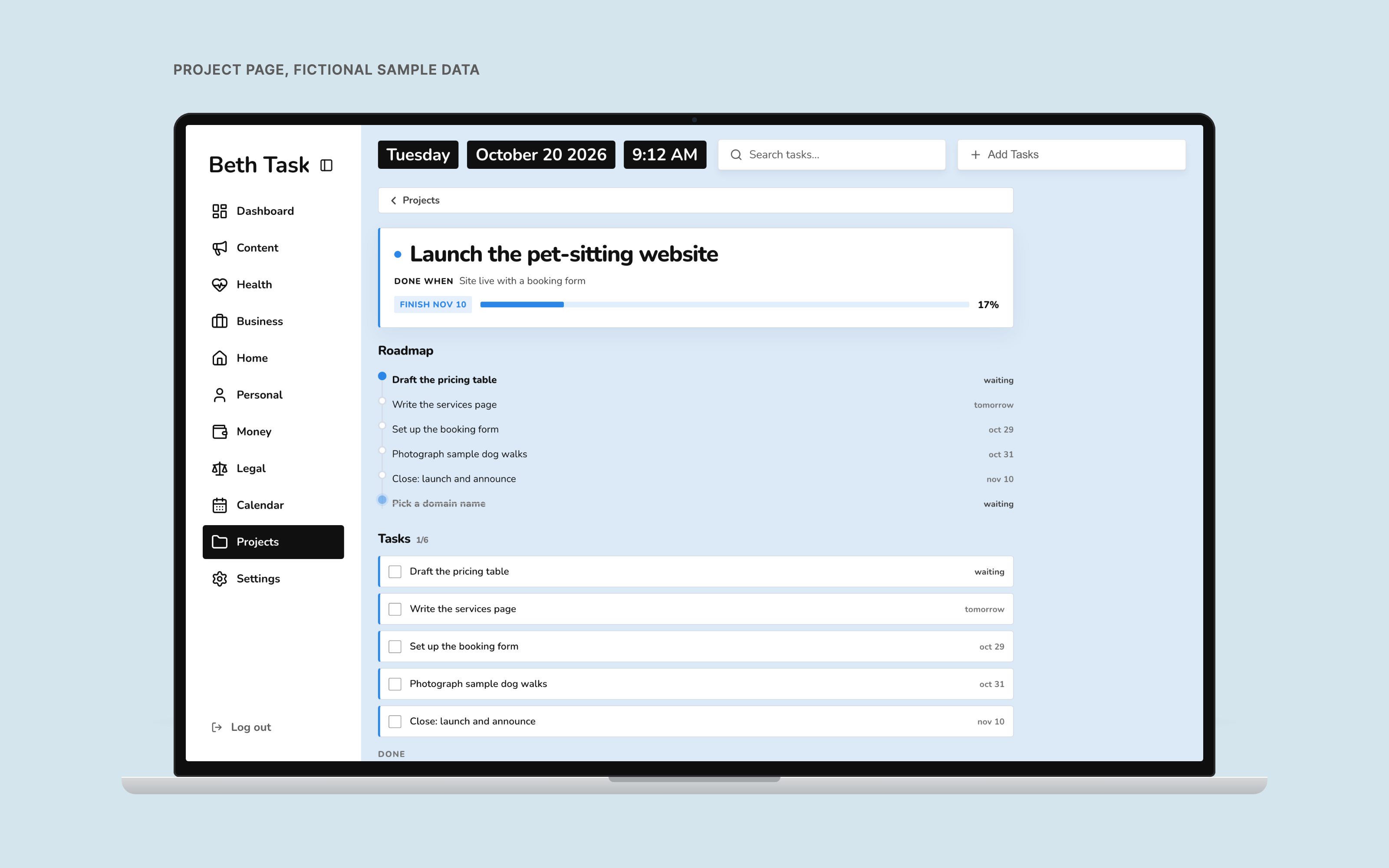
“Done when”, progress, and a roadmap with the next step in bold.
Why it works that way: the next step is bold and everything else is ordinary weight, so the page answers one question. Known bug: finished steps with a past date still read “waiting” (ProjectDetail.tsx:80, where Projects.tsx:81 shows “done”).
On a phone
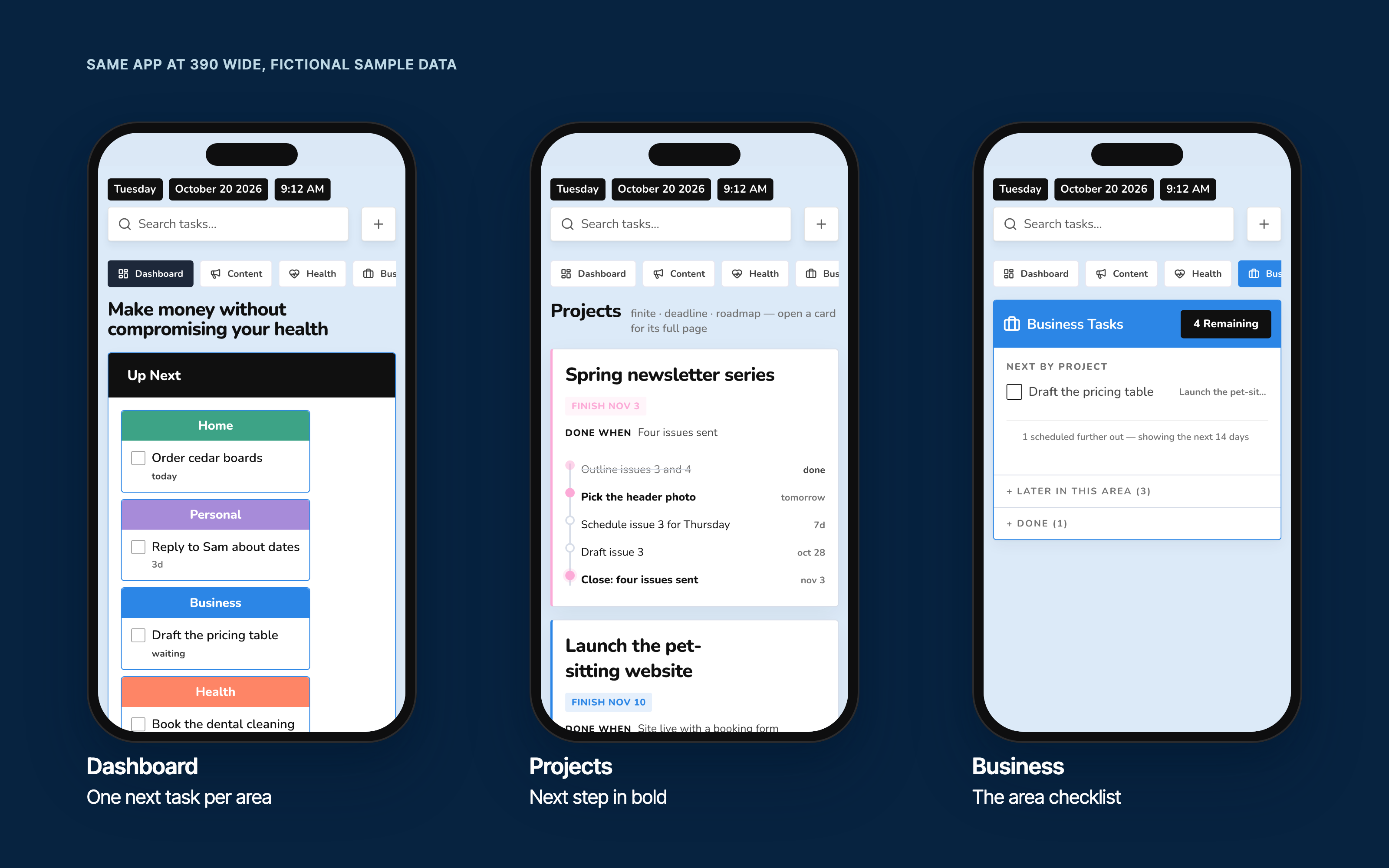
The same app at 390 wide. The Business screen shows the next task by project, then says what is waiting: “1 scheduled further out” and a Later drawer, so nothing feels lost.
Why it works that way: on a phone the cards stack in one column, and an area screen is a short checklist rather than a board.
When it is slow or down
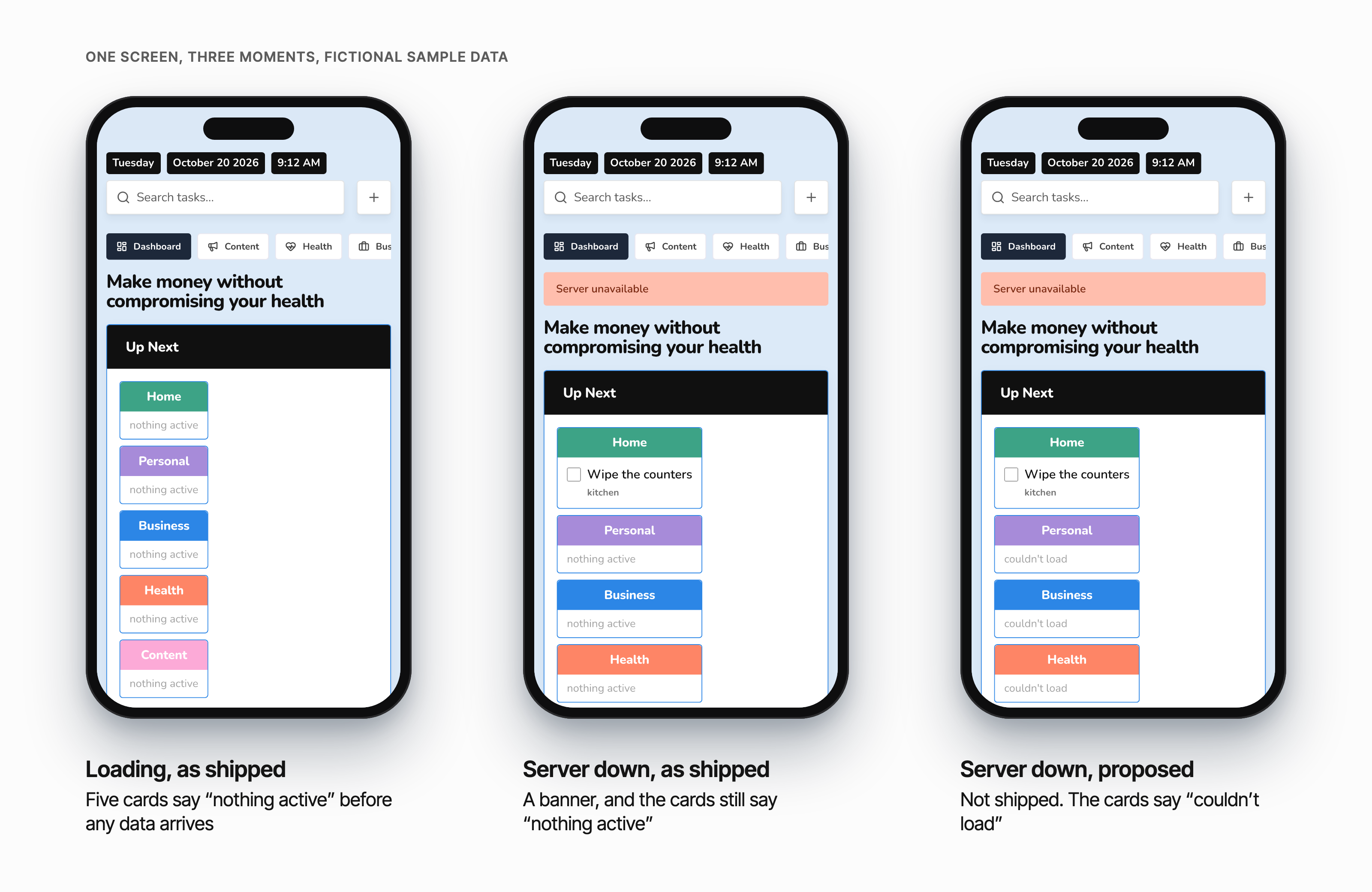
While data loads, all five Up Next cards say “nothing active”. When the server is down, a banner says “Server unavailable”, and every card except Home, whose chore lives in the browser, still says “nothing active”. Empty and failed look the same.
The area screens already guard this (AreaScreen.tsx:55 waits for loading to finish) and the Calendar screen has an error line, so the dashboard is the gap. It also swallows a failed calendar fetch and shows empty days (Dashboard.tsx:14).
In a scratch copy I tried the smallest fix: “loading…” while loading and “couldn’t load” on failure. It is the third phone below, labelled proposed. It is not in the shipped app.
Results
No launch metrics, and none implied. What exists: the app runs at beth-tasks.vercel.app, 166 commits, a database function that picks each project’s next task, and a second brain that reads the same order.
What I cannot say is that it made me faster or calmer.
Learnings
A ranker in the browser kept growing exceptions: parked, waiting, far away. Three exceptions meant the rule belonged in the database.
Measure before fixing. The 0px text bug looked like truncation and was not.
A date I did not choose is noise, and “waiting” is a kinder word than “30 days over”.
Empty and failed must look different. My own dashboard did not, and nobody saw it until the demo for this page was recorded.
Zero tests is a choice with a price. The head-picking function is the part I would test first.
The area colours do the job and fail contrast. I would rather fix that than explain it.
Next
- Say “loading” and “couldn’t load” on the dashboard instead of “nothing active”.
- Fix the “waiting” label on finished steps.
- Decide the contrast fix for the area colours, then give each “Mark done” button its task name.
- Stop the week strip spilling into the calendar card when a day holds a timed event plus tasks (seen at 1280 and 1440 in the demo).
- Tests for the head-picking function.