By the numbers
- 606commits in the repo, 5 March to 12 October 2026
- 27audit findings from two audits, 12 in June and 15 in September
- 12 of 15labs-page findings fixed in one commit on 11 September
- 12test files in the repo. A count of files, not a coverage claim
Build and audit facts from the repo, not results for users. There are no other users yet.
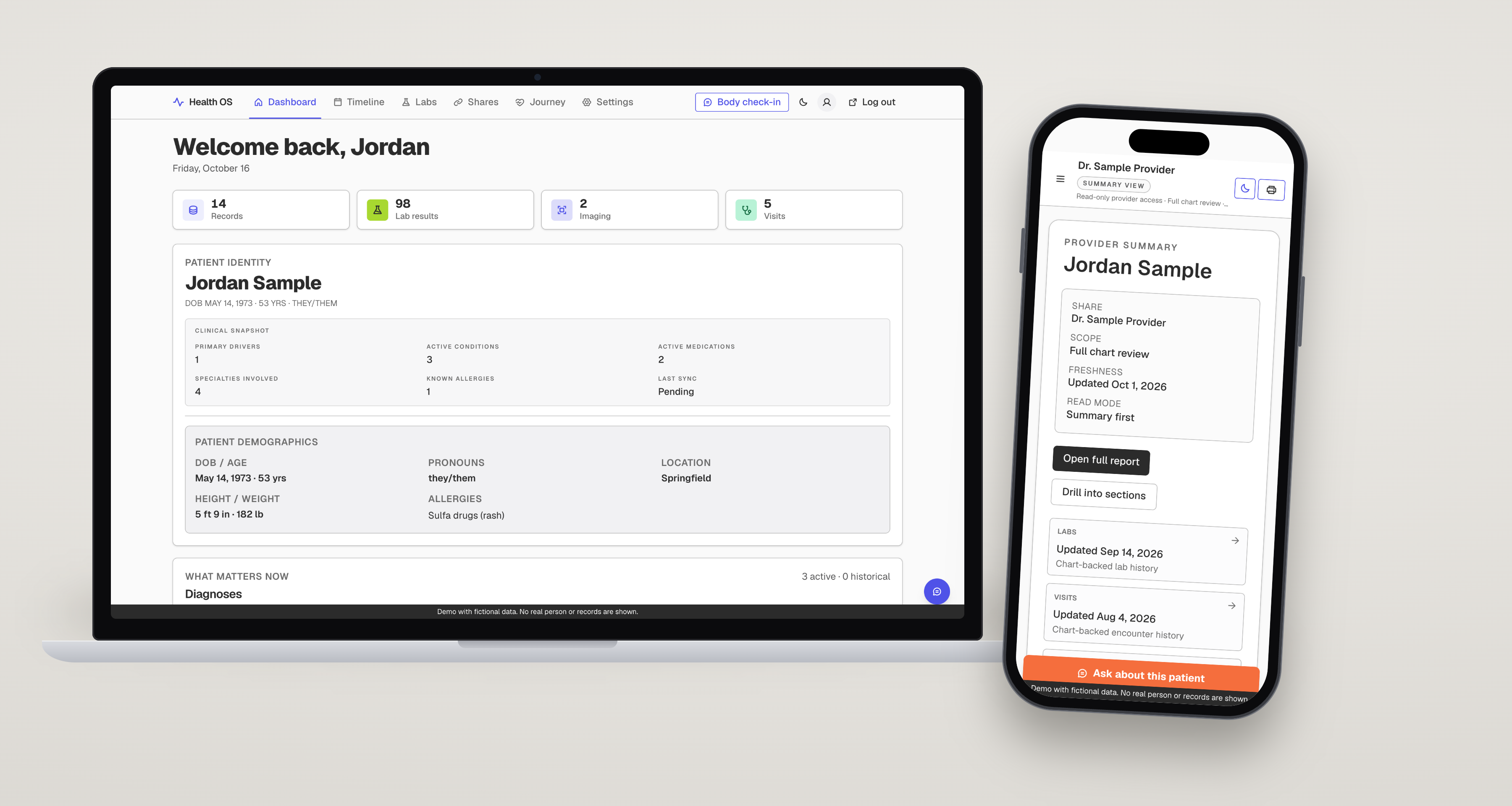
Text alternative for the video
What the video shows, in order: the dashboard with records, labs, medications and care team. The timeline filtered to one year with the Apply filters button. The labs page, the All filter, one test opened as a single chart with a data table under it, and the 1 year range. Then the provider share view: a summary first, then Open full report and the Labs section. Every name, value and date is fictional.
Discover
Overview
One person, one app, a design system in code, and a provider view that has to work in ninety seconds.
Health OS centralizes medical records into one database, adds a patient-reported layer between visits, lets the patient read their own record, and shares approved slices with providers through a token link, no login.
The UI is a CSS design system generated from tokens.json, with a showcase of 26 locked patterns. It is in development, used by one patient, and not open to others.
Define
Problem
The product has two readers who cannot afford a bad screen.
A patient on a bad day cannot type or explain. A clinician has a few minutes and a phone. Both need the same record to read as true, dated and unambiguous.
That sets the design constraints: no required fields, nothing undated, no meaning carried by color alone, and a report that scrolls.
Define
Persona
Two readers, one record.
“I used to dream about a machine that could scan and visualize pain, because my words were never enough for the doctors.”
Beth, from her public story
The patient: built for the worst day. If a feature only works on a good day it fails the mission, so the floor is one tap or one spoken word.
The clinician: skeptical by default, time-boxed, often on a phone. Read order is story first, proof second, with safety facts early.
The clinician is a composite from the June share-view audit and the clinician research, not an interviewed person.
Discover
Research
Reading, audits and three consults. No usability tests yet.
| Clinician and advocate material | Five podcast or interview transcripts of EDS clinicians, three advocate-meeting transcripts, four articles and two course references, read and synthesized in April 2026 into what specialists want from patient data. |
|---|---|
| Three consults and two messages | Three appointments where I showed the app for the first time, plus two written messages afterward. Their reactions are kept in a quote bank. This is feedback, not usability testing. |
| Two audits | A code-backed UI and UX audit of the product routes on 29 June (12 findings, no running app) and an audit of the labs page on 11 September (15 findings, static analysis). A designer-to-designer review of the share view on 18 June was rendered in a browser against production. |
| Not done | No usability test with other patients. No screen reader run. Contrast was not measured in the labs audit. No outcome measure of any kind. |
Design
Key decisions
I approve before a doctor sees anything, and nothing in it guesses.
You approve what a provider sees, before they see it
- Options
- Share everything by default, toggle items at share time, or review what is new in one batch.
- Chose
- Anything new stays hidden from the provider link until I approve it in a short batch review, and I can uncheck anything. My own words, voice and photos stay on my timeline.
- Cost
- One more step every time, and a link can look out of date if I have not approved. So every section says when it was last updated, and nothing clinical shows undated.
A report you scroll, not a sequence of sections
- Options
- A welcome screen and a sidebar that shows one section at a time (what I built first), or one report a clinician can read top to bottom.
- Chose
- One report, read top to bottom. The June audit of the share view found the welcome screen gated the chart and the case sat behind ten clicks, so the running app now opens on a summary with an Open full report button.
- Cost
- Clinicians had already reacted well to the first version, so I was changing something that worked for some of them. I have not confirmed that every audit fix shipped.
No medication tracker
- Options
- Supply counts, refill countdowns and taken or missed logging, or only the reactions to medicines.
- Chose
- Cut, twice, on 30 August and 3 September. A tracker is another layer of HIPAA regulation and the second brain already does that job. Reactions to medicines, foods and environment stay as symptom evidence.
- Cost
- No refill reminders in this app. A supply card still exists in the code from before the cut, and the roadmap holds the decision on it.
Labs: one chart, list first, color only for out of range
- Options
- Every trended test on one page (163 charts), and falling shown as good, rising as bad.
- Chose
- A ranked list plus one full-width chart with hairline limits and text flags. Direction is neutral and only a result outside its limits raises the alarm, because for ferritin or hemoglobin falling is the worry.
- Cost
- No way yet to put two tests on one axis. The September audit calls that out of scope and a separate spec covers it.
What I felt is labeled, and never outranks the record
- Options
- Let an AI summarize everything and flag what it finds, or keep both layers visible and say nothing when unsure.
- Chose
- Patient-reported entries are always labeled and never shown as clinical fact. The AI layer waits until the record is true and the patient side is running, and it says worth mentioning, never a cause or a diagnosis. Silence beats a guess.
- Cost
- The part that makes it more than a file cabinet comes last, in the third phase.
Design
Accessibility
Accessibility is a requirement here. The target is AA, and it is a target, not a verified result.
- Design law
- Built for the worst day. Every capture path must work when the patient cannot type, explain or sit up.
- Provider baseline
- WCAG AA contrast (4.5 to 1), a 12 px font floor, a visible 2 px focus ring, a non-color indicator on every color, keyboard support.
- Audited
- 29 June: 12 findings, including no skip link, generic page titles, an imaging overlay that was not a real dialog, and filters that changed the page on every selection. By 11 September the skip link was in the code.
- Fixed on 11 September
- F-001 to F-012 of the labs audit in one commit: paging so a page no longer draws 163 charts, a text alternative for each chart, a switch to turn auto-refresh off, live status regions, table captions and column scopes, aria-current instead of aria-pressed on a single-choice list.
- Not verified
- Contrast was not measured. No screen reader was run. Reflow at 320 px was not checked in a browser. The README says WCAG 2.1 AA and the audits say 2.2, so the standard needs one name.
Design
Flow
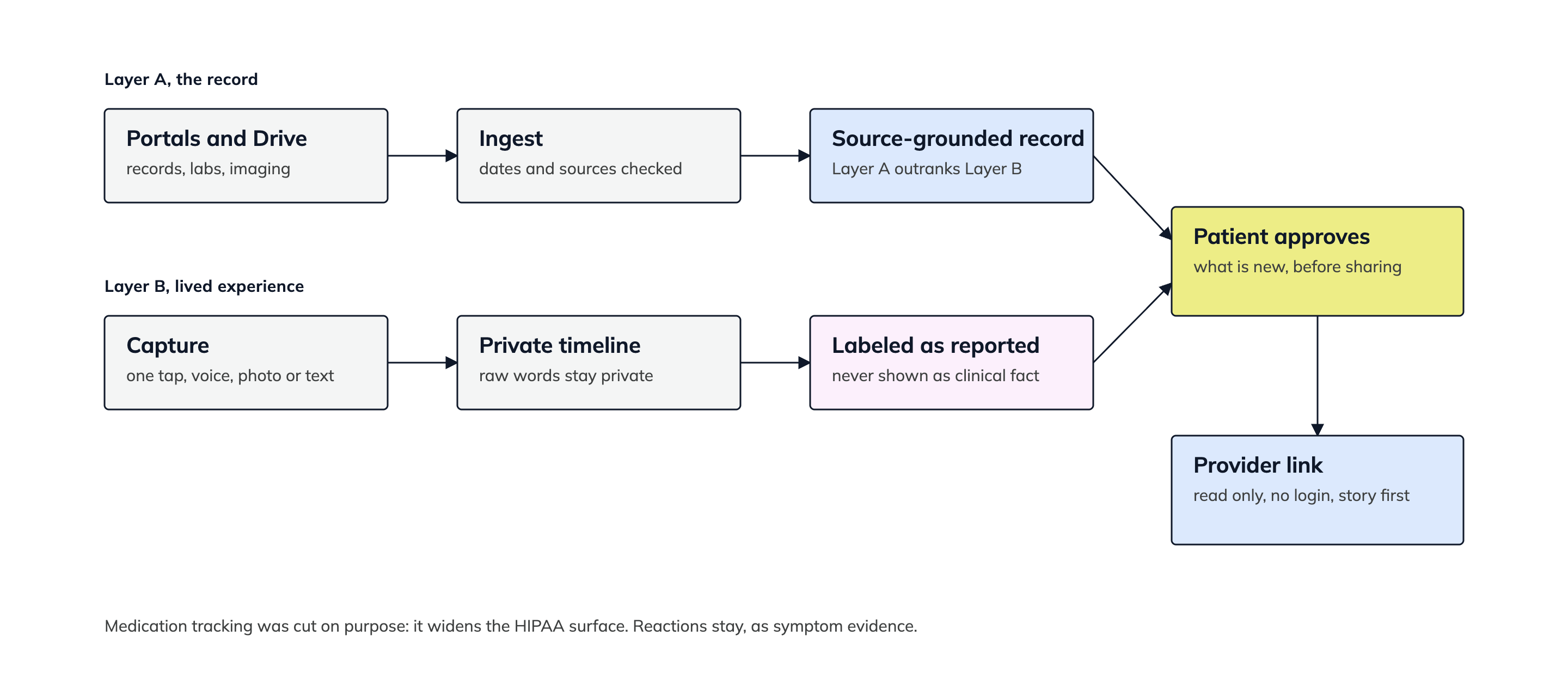
Two layers in, one approved slice out.
Records and patient-reported notes stay separate and labeled. A provider only ever sees what the patient approved.
Design
Hi-fi screens
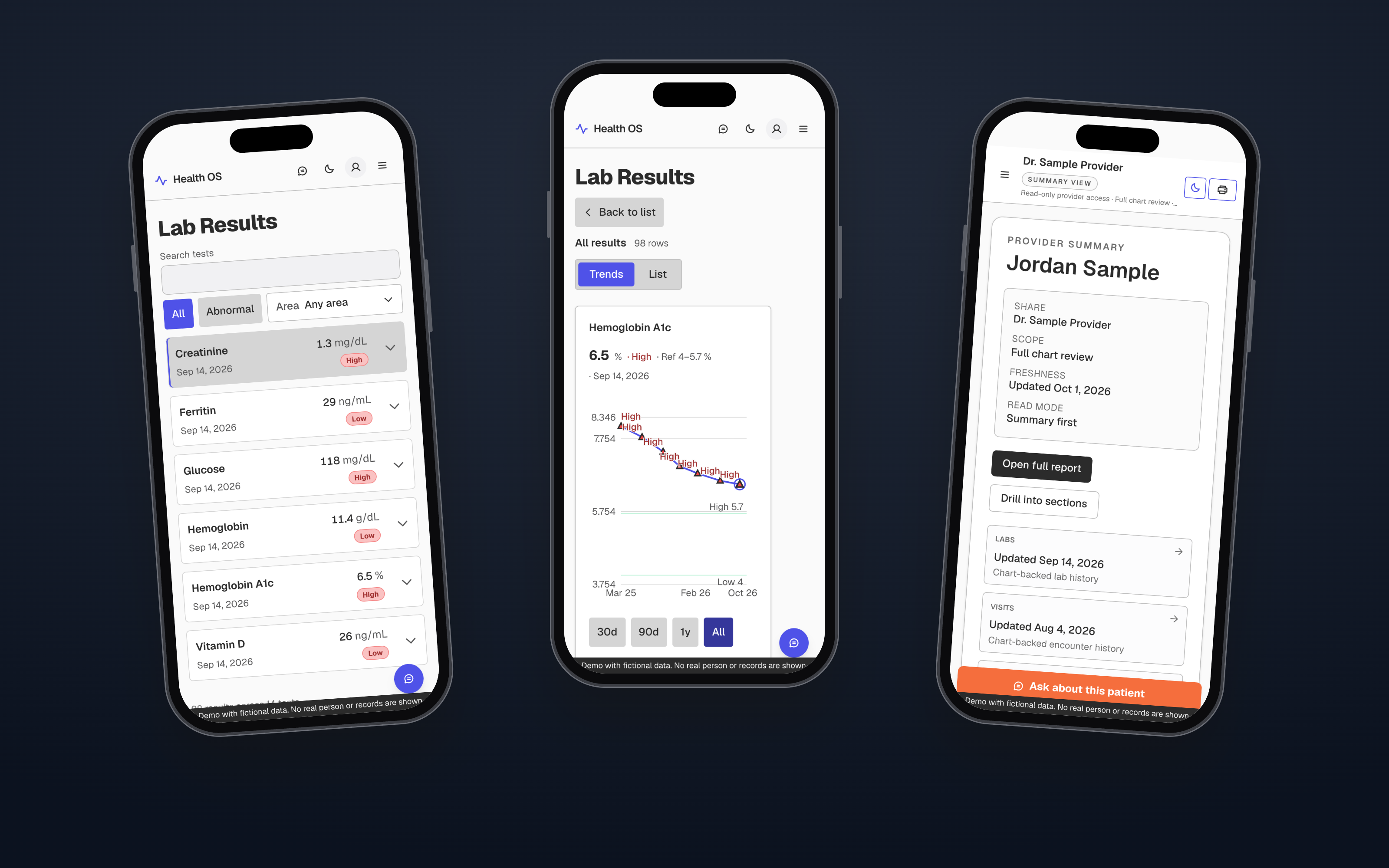
A doctor gets the summary first, and a phone gets the list first.
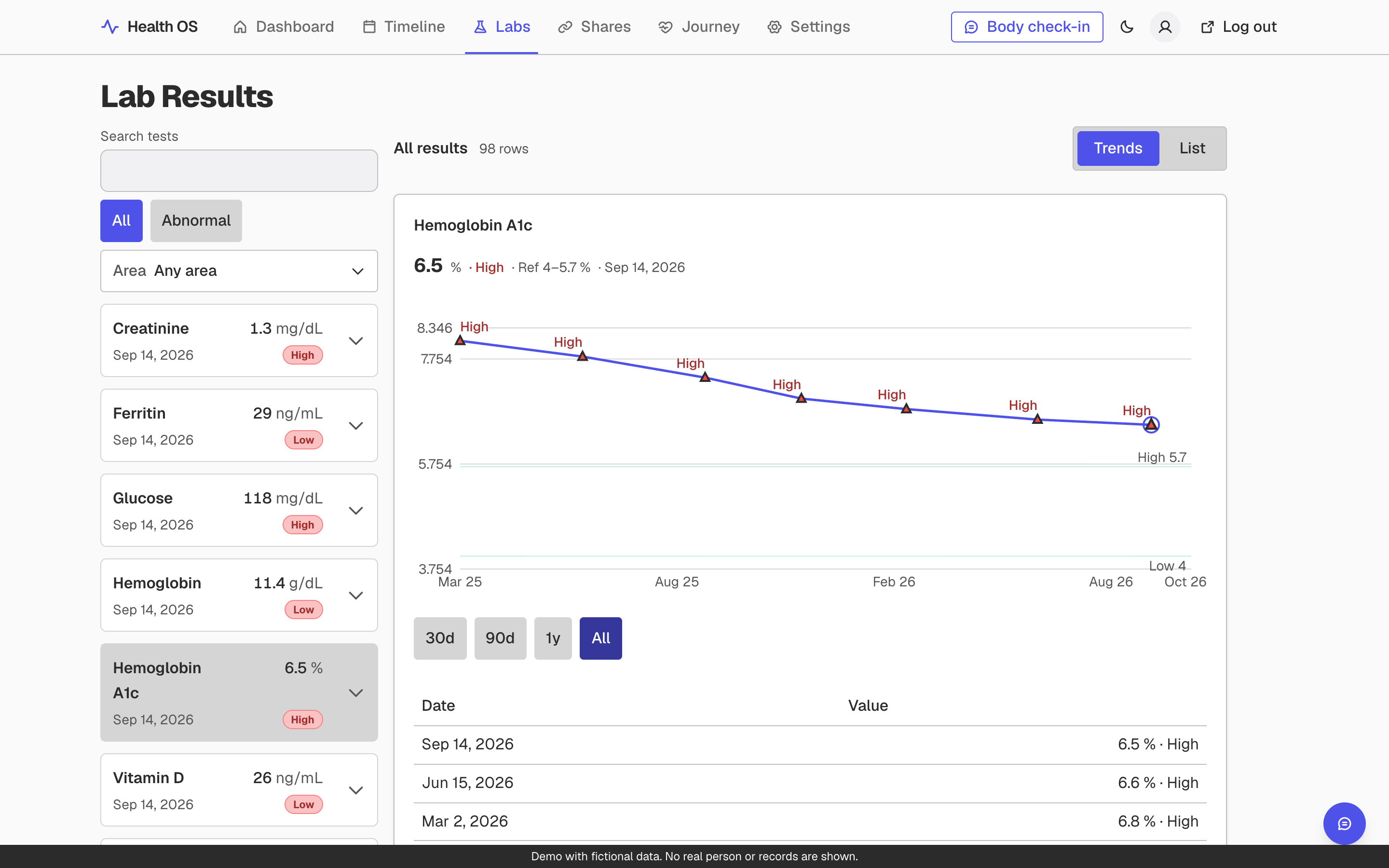
These screens are the real app code running on a made-up person, Jordan Sample. A thin footer on every screen says so.
Labs, one chart at a time
The list is ranked so out-of-range tests come first, and a phone shows the list until a row opens the chart. Limits are drawn as labeled lines on the same scale, flags are words as well as color, and the table under the chart carries the same numbers for anyone who cannot use the plot.
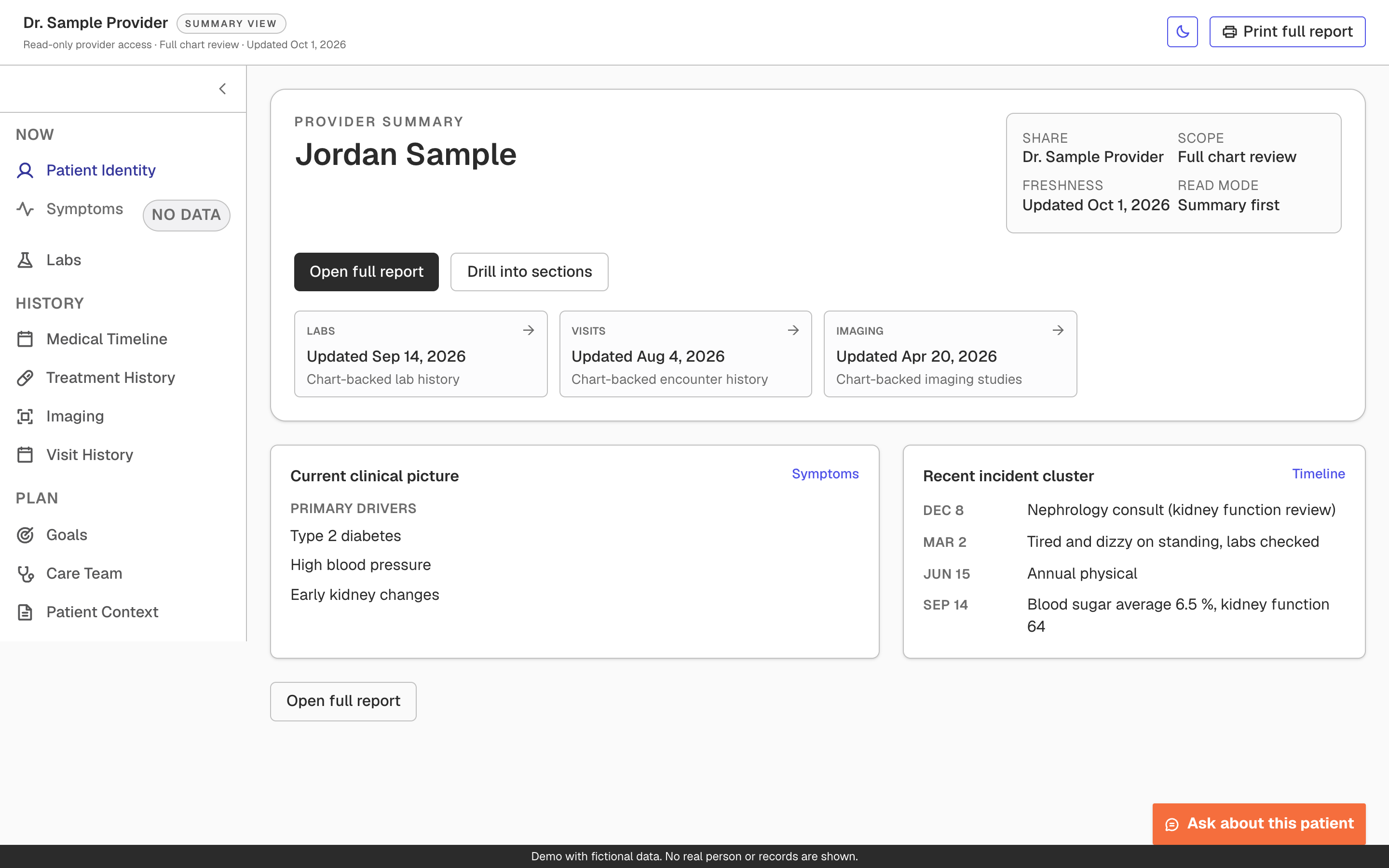
Provider view, summary first
A clinician opens a link cold, with no login, usually short on time. The first screen says who the patient is, what was shared, and when each section was last updated. Open full report puts every section in one scroll, so the case can be read top to bottom or printed.
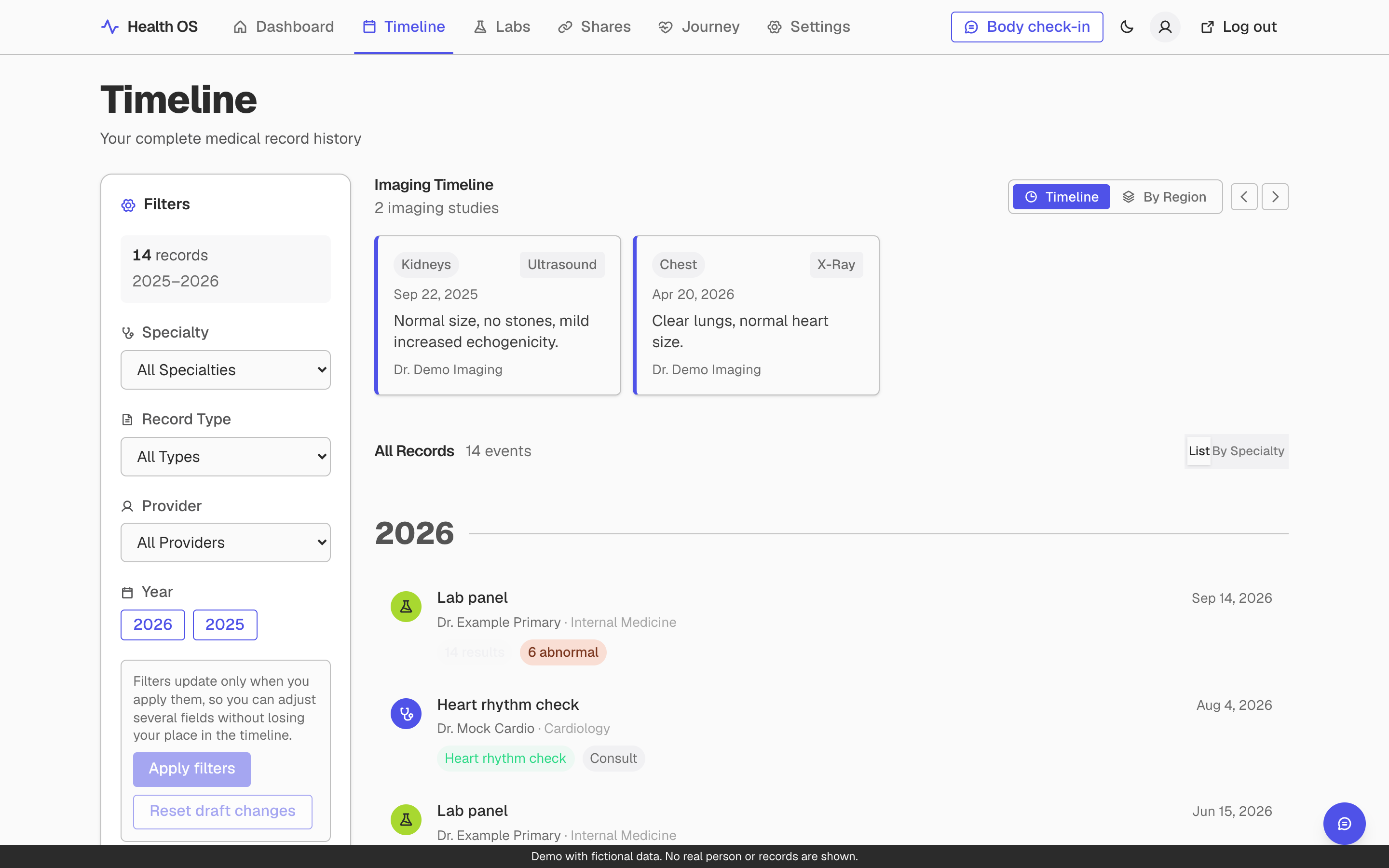
Timeline, filters that wait for you
Filters apply only when you press Apply filters. The June audit flagged filters that changed the page on every selection as a loss of context, and the panel now says so in plain words next to the button.
Reflect
Results
A running app and three consults, and no outcome number yet.
- There is a running app, 606 commits in seven months, and two audits with most of the labs findings closed in a day.
- I showed the first version in three consults. One specialist, in May 2026, said “Oh my gosh. You made this?” That is a reaction, not a measurement.
- From my own story: before my surgery, my vascular surgeon looked at the app and asked how I built it. Then he told me I was too smart and too talented to be in bed all day, and scheduled the surgery that changed my life.
- What I do not have: any user other than me, any number that shows an outcome, or a public launch. I am not going to imply one.
Reflect
Learnings
Running the fix in a browser found what the audit could not.
A static audit gave me 15 findings. Verifying the fixes in a browser against live data turned up three more real bugs, two introduced by my earlier change.
Semantic color is a content decision. Direction coded as good or bad was wrong for tests where low is the problem, so the system now flags only out-of-range values and keeps direction neutral.
I built the section-gated provider view before researching the reader. The audit that rejected it was right, and I would test the reading path before building it.
The roadmap drifted: three features landed with no plan while the stated first priority sat unbuilt. A design system does not fix that, a roadmap does.
The mobile chart still crowds its flag labels on dense series. Known, not fixed.
Reflect
Next
Make the record true, then the patient side, then the AI.
- Now Make the record true: every provider’s data in, current, and the provider view reflecting it the same day. Target 31 October 2026.
- Next Make the patient side alive: capture and My Record, then thirty days of real self-capture.
- Then The AI layer, reading both layers and saying worth mentioning, never a cause.
- Later Usable by someone who is not me: waitlist, multi-tenant, HIPAA, an advocate workspace.
- Also drafted A public demo of the real app with fictional data. Drafted, not approved, not deployed.